
RPA · AI · Agents
Robotic process automation is no longer just a robot copying data from one screen to another. Today we combine RPA, artificial intelligence and agents so your company stops retyping what is already written: AI reads and understands the documents, the robot does the work in your applications, and a person only reviews what falls outside the norm.
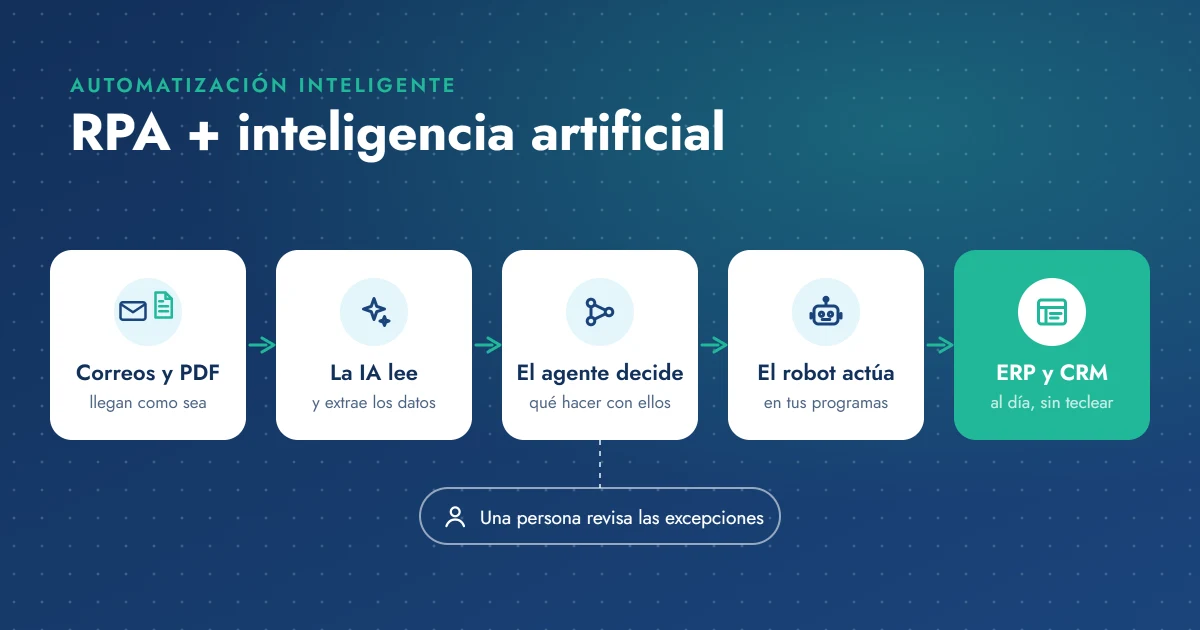
RPA (Robotic Process Automation) is software that mimics what a person does at the computer: it opens applications and websites, copies and pastes data, fills in forms, downloads files and sends emails. It works on the applications you already have, without changing them, and it never gets tired or makes typing mistakes.
Classic RPA had a limit: it only worked for tasks with fixed rules and tidy data. If an invoice changed format or an email was worded differently, the robot stopped. Artificial intelligence removes that limit: it understands documents, emails and photos even when each one is different, classifies them, extracts the data and suggests what to do. That is why we now talk about intelligent automation: RPA to do, AI to understand.
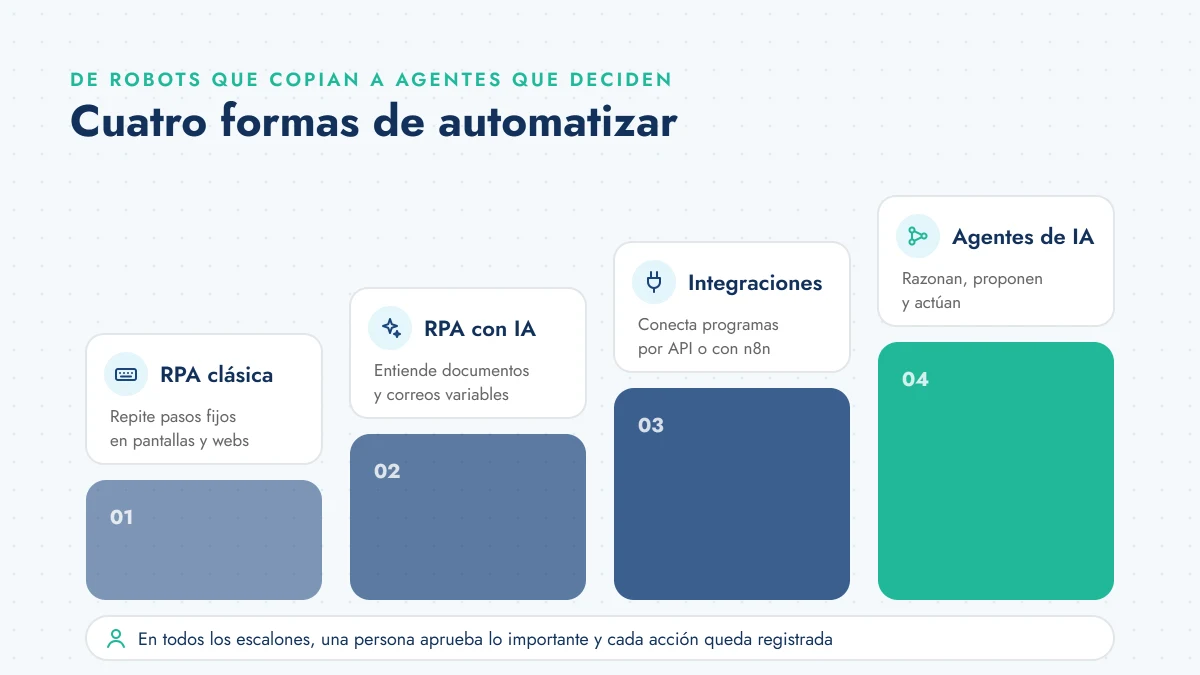
Not everything is automated the same way. We choose the simplest technique that solves the problem, and several are often combined in the same process.
| Technique | What it does | When it fits | Example |
|---|---|---|---|
| Classic RPA | A robot repeats fixed steps on screens and websites. | Applications or portals without an API, tasks with clear rules. | Downloading a customer portal’s delivery notes every day. |
| RPA with AI | AI reads and understands documents and emails; the robot records the result. | Invoices, orders or certificates arriving as PDF, photo or email, each in its own format. | Reading supplier invoices and leaving them as drafts in the ERP. |
| Integration with n8n or API | Applications talk to each other directly, with no screens. | When the applications have an API: faster and more stable than a robot. | Every web shop order creates the order and the customer in Odoo. |
| AI agents | They receive a goal, query data, reason and propose or carry out actions. | Tasks that need judgement: prioritising, replying, preparing proposals. | Reviewing customer emails, drafting the reply and opening the ticket. |
AI reads the PDF, suggests the ledger account, matches it with the purchase order and leaves it as a draft. Accounting just approves.
Bank statements downloaded, payments matched to invoices and overdue customers flagged with the email already written.
Orders in a PDF or in the body of an email turned into sales orders, with the customer and products recognised.
Automatic comparison of quotes received in different formats and a proposed purchase order.
Incoming emails classified, a reply drafted from your documentation and a ticket opened when needed.
A photo of the receipt becomes a completed expense report; timesheets are collected and booked to each project.
A robot checks the portals, updates each shipment’s status in the ERP and warns of delays.
Material certificates and machine reports read and recorded against the right lot or manufacturing order.
Data from several applications gathered every Monday into a report or dashboard, with no spreadsheet exports.
Several of these examples already work as products inside Odoo: reading supplier invoices with AI, expense reports from a receipt photo and the AI agent for Odoo.
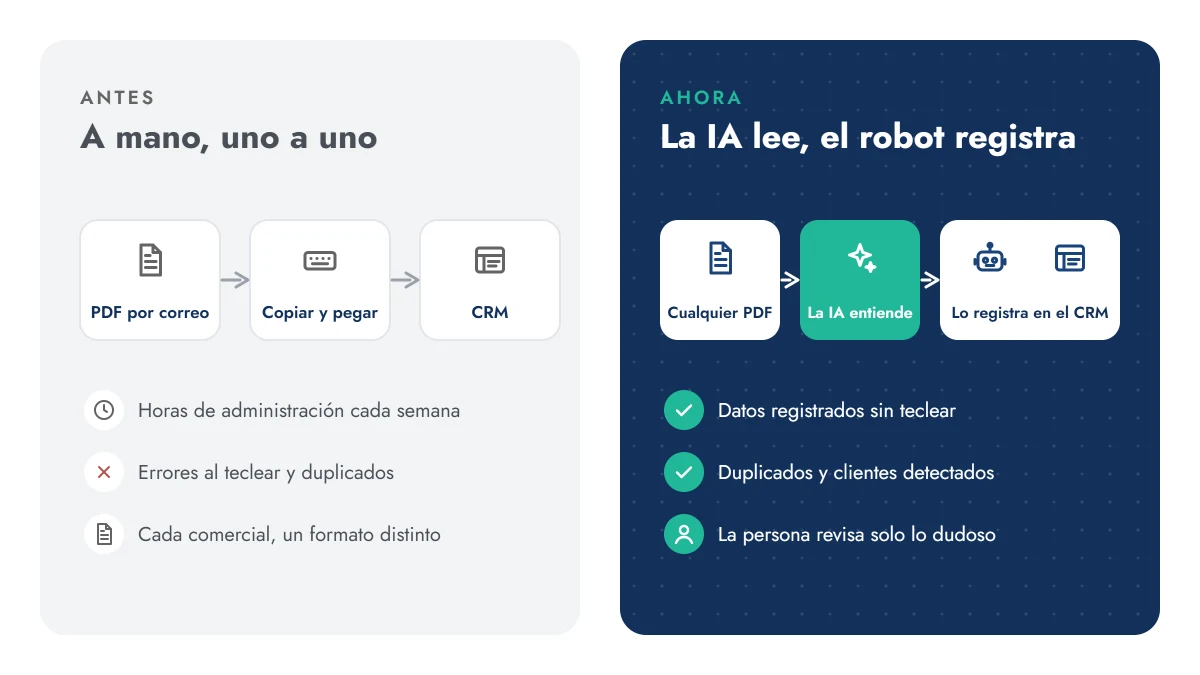
A client received their sales reps’ opportunities by email as PDFs, and the back office typed them one by one into a web CRM. It was slow and errors crept in.
A robot read the emails, converted the PDFs into a file using a fixed template and loaded them into the CRM. It worked as long as every rep used exactly the same format.
AI understands any PDF or email, however each rep writes it; it spots duplicates and existing customers; the robot or the integration records it in the CRM, and a person only reviews the doubtful cases.
Automations handle sensitive data, so we design them so you always know what they do: every action logged, minimum permissions, human approval on critical steps and, if you need it, AI models on your own server so no document ever leaves the company.
We have been implementing and developing Odoo ERP for years and have integrated ERPs, CRMs, websites and machinery.
We have AI products in production inside Odoo, and with Future AI, the Binovo Group’s AI company, we build agents and automations with n8n.
From Oiartzun (Gipuzkoa) we work with companies across the Basque Country and Navarre, and remotely with the rest of Spain.
It is software that automates repetitive tasks by mimicking what a person would do at the computer: opening applications and websites, copying data, filling in forms or sending emails, without changing the applications you already use.
RPA carries out fixed steps and rules; AI understands variable content, such as documents, emails or photos, and suggests decisions. Together they automate processes that used to need a person reading and typing.
Not entirely. Agents decide what to do, but to act in your applications they still need an integration or a robot. The usual approach is to combine them: the agent decides and RPA or the API executes.
No. RPA works on the applications and websites you already have. If they have an API, direct integration is even better.
Yes. For Odoo we also have our own AI modules, and we automate on other ERPs, CRMs, web portals and desktop applications too.
With one specific process that takes up many hours or causes errors. We analyse it, build a pilot and measure the result before scaling up.
Tell us about it and we will explain how we would automate it and what savings you can expect.


